You don't need to be the Python expert.
The student who asks you something you're not sure about? They've already got a hint. You just need to know where to point them.
No marking. Ever.
Every challenge is marked the moment a student runs it. They see how they've done; you get your evenings back.
📋 Covers the spec you actually teach
Full curriculum coverage for GCSE Computer Science. All major exam boards (OCR J277, AQA 8525, Edexcel 1CP2) are supported with 27 lessons and 134 challenges.
🚀 Nothing to install. Nothing to chase IT about.
Runs in the browser on whatever the students already have — Chromebooks, tablets, desktops. No installs, no admin rights, no "it doesn't work on my laptop" conversations.
🏫 See the whole room at once
Create classes and share secure Join Codes so student progress syncs to the cloud in real time. Monitor your whole class from a centralised dashboard, invite co-teachers, and manage class history with archive and restore.
You'll know who's stuck before they raise their hand.
Most coding lessons have an invisible problem: the students who are stuck look identical to the students who are thinking. By the time you find out someone's been lost for twenty minutes, the lesson has already gone.
Python Coach gives you a live view of every student's progress — which challenges they've completed, where they've stalled, and who hasn't made any progress recently. The information that used to only exist at the end of a lesson is there the whole time.
Start your free trial →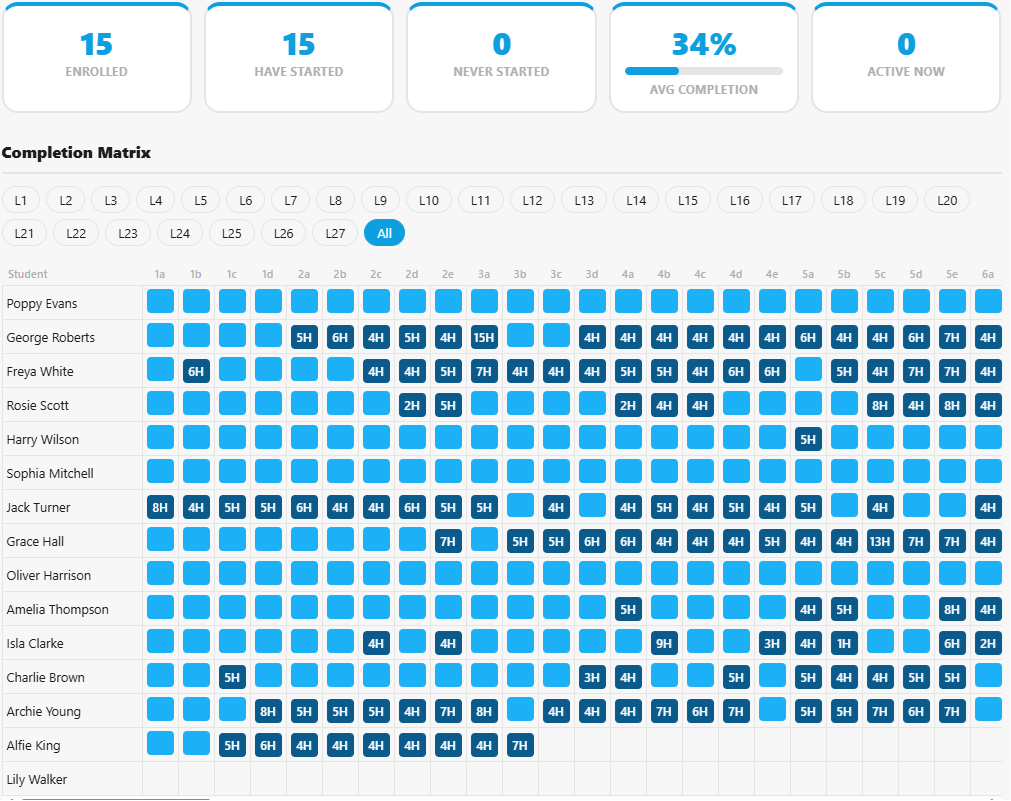
Frequently Asked Questions
Start with one class. You don't need to commit to anything.
Free for 60 teaching days. No card, no IT request, no marking.
Less than the cost of one day of supply cover.
Start your trial →